rachelmanija: (Books: old)
rachelmanija ([personal profile] rachelmanija) wrote2026-01-13 10:17 am

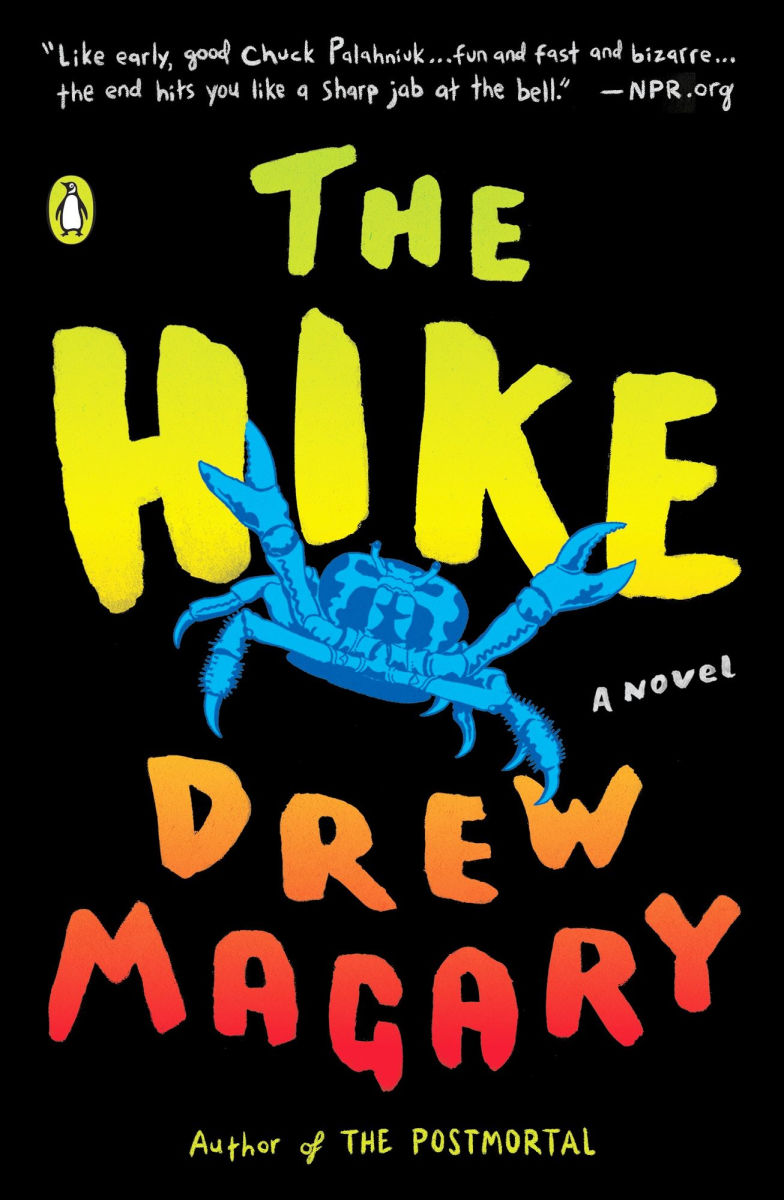
The Hike, by Drew Magary


Ben is on a work trip, away from his wife and three young children, when he decides to take a hike through the woods by his hotel. Ben sees a man with a Rottweiler face disposing of a corpse, and flees into the woods with the dog man pursuing him.

The next thing he knows, he's trapped in a surreal world halfway between a nightmare and a video game. It often involves distorted reflections of his own past - Ben has a scar on his face from a Rottweiler bite and he keeps getting attacked by Rottweiler-faced men, an old lover appears at the age she was when he last saw her, and he befriends a talking crab that knows a suspicious amount about him. He has to stay on the path, or he'll die. A mysterious old woman gives him tasks and tells him the only way he can get home is to find the Producer. Things appear and disappear in a very dreamlike manner, the scene shifting from a cannibal giant's castle to a hovercraft to a desert. After each ordeal, he gets a banquet with champagne.

This extremely weird book is a bit like a dreamlike, horror-inflected Alice in Wonderland for bros. I almost gave up on it halfway through - it was so "one random thing after another and the whole thing is clearly not real" that I got bored - but that's when something happened that intrigued me enough to continue. It doesn't need to be as long as it is - it's a short book that would have been better as a novelette - but the ending, while not explaining all that much, still manages to be satisfying.

I wouldn't re-read this - the actual reading experience often felt like a slog - but it was definitely different and had some good twists, so I'm not sorry I read it. I suspect there's some overlap in readership between this and Dungeon Crawler Carl.

Don't read the spoilers if there's any chance you'll actually read the book.

Spoilers! )

Probably it's all a metaphor for life.

Content notes: Horror-typical gore and gross-outs.
Lifehacker ([syndicated profile] lh_wayfarer_feed) wrote2026-01-13 05:30 pm

My Favorite Amazon Deal of the Day: The Samsung Odyssey G5 Gaming Monitor

Posted by Daniel Oropeza

We may earn a commission from links on this page. Deal pricing and availability subject to change after time of publication.

When it comes to gaming monitors, having an ultra-wide curved screen takes the experience to the next level, with a more immersive experience than a regular monitor. Unfortunately, that improved experience tends to come at a much higher price. But there are budget monitors that go on sale, making it much more affordable to upgrade your gaming without hurting your wallet too much. Samsung is currently selling its 34-inch Samsung Odyssey G5 for $279.99 (originally $399.99).

The Samsung Odyssey G5 is a great ultra-wide monitor for those who haven't used one before, with all the important specs you'd want while keeping the price relatively low. Other high-end, bigger ultra-wide monitors go upwards of $700, like the Odyssey OLED G9. Those are much bigger and offer OLED quality visuals, though.

The Odyssey G5 comes with a 1000R curve, which Samsung claims is optimal to avoid eye strain. Your media will be displayed on a 21:9 aspect ratio and 3440x1440 resolution, which means if you watch videos that are not compatible with that ratio, it'll have some black space on the sides to prevent it from looking stretched. You also get a 165Hz refresh rate and native FreeSync variable refresh rate (VRR) support, helping fast games look smoother. The input lag is 1ms, which is very fast for a budget gaming monitor. It's also compatible with HDR10, so watching movies or shows will look good, but mostly in dark rooms since the HDR peak brightness isn't very high.

Deals are selected by our commerce team
yourlibrarian: SoItBegins-misty_creates (SPN-SoItBegins-misty_creates)
yourlibrarian ([personal profile] yourlibrarian) wrote in [community profile] tv_talk2026-01-13 11:50 am

TV Tuesday: Is This Us?

Laptop-TV combo with DVDs on top and smartphone on the desk


A Financial Times article discussed a cultural change during the holidays in Britain, as smart TVs and non-TV viewing by a younger generation means that there is much less viewing of holiday specials, which had been a national tradition. Instead "data shows children as young as four spend longer watching YouTube each day than all PSB services combined", and that ratio is even worse with young teens. The article notes the situation is equally dire for other European broadcasters.

In the article, the concern is that younger viewers are turning away from content that is authentic to and about their own country. In the U.S., too, public television is under threat. Are there TV traditions that are disappearing due to the shift in viewing? What might be gone in another generation or two?
Universal Hub ([syndicated profile] universal_hub_feed) wrote2026-01-13 05:19 pm

City cancels another developer's plans for vacant land across from BPD HQ; now looks to build new Ma

Posted by adamg

The Globe reports the Boston Planning Department says it will cancel plans for a life-sciences and residential development - and space for an Embrace Boston museum - on the nearly 8-acre P3 parcel that has long sat unused off Tremont Street across from the Boston Police Department headquarters and will instead look at using it to build a replacement for the neighboring Madison Park vocational school. 

HYM and My City at Peace had won city approval in 2023 for a complex, four years after the then BPDA finally yanked approval for another group's mall-focused plans because that effort had gone nowhere for 12 years.

Topics: 
Neighborhoods: 
heleninwales: (Default)
Helen ([personal profile] heleninwales) wrote2026-01-13 05:45 pm

Book notes

I said I'd post about books I've been reading, so here we go. Libriomancer by Jim C. Hines.

I really wanted to like this, but having got half way through, I've put it aside. Though the way the magic works is really cool, I had a couple of problems with it.

A libriomancer can use magic to pull items out of books into the real world. The main character, Isaac Vaino used to be a field agent, but now, after burning out on active service, is a librarian with a pet fire spider which originally came from a book. The book starts in media res to the extent that I actually checked that it really was book 1 in the series. There was a lot of back story piled into the first chapters that I don't think we actually needed to know until it became relevant. But my main turnoff was a) the vampires and b) Isaac doesn't seem to be able to meet anyone without ending up in a fight. Unfortunately I just don't like vampire stories. That's a me thing and anyone who was more vampire tolerant might well enjoy this book. However, every interaction ending up as a fight to the death felt like overuse of the "there must be conflict" advice. To say the book was fast paced was an understatement. The plot felt rather frenzied.

Having said all that, I may return to the book and finish it at another time. One reason for putting it aside was that it wasn't suiting my present mood, which at this time of year tends to be a bit dismal. The constant frenzied action felt jarring. Instead I've started reading Still Waters by E. C. R Lorac, a writer I very much enjoy. She writes mysteries and is more or less a contemporary of Agatha Christie, but IMHO write much more interesting stories. More about this book when I've finished reading it.
Social Sciences News - Psychology, Sociology ([syndicated profile] phys_social_feed) wrote2026-01-13 12:07 pm

Mothering in a time of crisis and anxiety is a society-wide job, new research shows

Raising a child is never easy. But crises like climate change, social unrest, financial collapse and pandemics are adding pressures on new and expectant mothers to serve as sources of comfort for society as a whole, according to a new Concordia study.
Universal Hub ([syndicated profile] universal_hub_feed) wrote2026-01-13 04:55 pm

MBTA cancels massive Alewife redevelopment plan

Posted by adamg

Streetsblog Mass reports the MBTA has shelved plans to redevelop its 30-acre Alewife site, including its end-of-life parking garage, due to changing development market conditions.

Topics: 
Neighborhoods: 
Free tagging: 
wickedgame: (Gael | Good Trouble)
wickedgame ([personal profile] wickedgame) wrote in [community profile] icons2026-01-13 07:05 pm

multifandom icons.

Fandoms: 9-1-1, Cobra Kai, Crazy Handsome Rich, Dead Boy Detectives, Heated Rivalry, Legend of the Seeker, Maxton Hall, Ransom Canyon, Stay By My Side

deadboydetectives-1x04.png heatedrivalry-skip1.png lots-2x09aaaa.png
rest HERE[community profile] mundodefieras 
Ask a Manager ([syndicated profile] askamanager_feed) wrote2026-01-13 03:59 pm

I’m about to have a new coworker who I have a traumatic past with

Posted by Ask a Manager

A reader writes:

I’m at a loss here.

I have a coworker I’ll call Riley from a different department in my organization. Riley and I were becoming pretty good work friends, when they experienced a psychotic break and tried to end their own life. I didn’t want someone I cared about to die, so I stepped up as a support person. I learned that Riley had been hospitalized before for the same reason before we met. I thought I was equipped to absorb some of their pain while they worked through mental health treatment and stabilized.

Riley was better for a few months, then spiraled and went back to the hospital. This cycle never stopped. I don’t even remember how many times they came back from the brink, both with and without hospitalization. We were constantly in touch. Avoiding my phone for an evening meant coming back to a bunch of scary texts, and then I’d spend hours talking them back to safety. It was terrifying and exhausting.

After about two years of this dynamic, they went off their meds again and I snapped. I told them I needed a break and not to contact me for a while.

This happened years ago and we haven’t spoken since. They did send a long email owning how manipulative they’ve been (even without always meaning to be) and apologizing for their behavior. Their condition isn’t their fault, but I’m still struggling with the after-effects of this friendship. They weren’t the only stressor in my life, but the stress of experiencing a constant cycle of life-or-death situations broke something in me. I’ve been less able to cope with more normal stressors than I used to be, let alone major ones. I keep people at a greater distance than I used to. Some physical symptoms I’d been having on-and-off became constant, until I was finally diagnosed with an autoimmune disorder. I can’t put full responsibility for these issues on one person, but I often wonder what life would be like if I’d set a really firm boundary earlier.

I never responded to their apology email, which I’m not proud of because it took real courage to admit wrong, but I feel so used and it’s very painful. They have texted me occasionally outside of work, and I’ve never responded to those either. Working in different departments has mostly let us organically avoid each other at work. Seeing their name on my text notifications or Zoom roster gives me instant panic symptoms. And when I think about what to even say in a response, I draw a blank. Even writing this out is giving me nervous sweats!

Our workplace is going through a reorg. Naturally, Riley has been reassigned to my team and we’ll have overlapping project work that we’ll have to collaborate on. Riley sent me an email acknowledging that this is awkward and they want to have a positive professional relationship. (Of course, I haven’t responded to that either.)

I want to be professional and take the high road, but I also just want to keep as much distance as I possibly can. I feel emotionally immature for reacting this way, but I feel like I’m being exiled from a safe space. Because the circumstances are so wrapped up in private, sensitive medical information, I don’t think talking to anyone at work is an option (plus our HR is not trustworthy).

Take the opportunity to respond to their email and lay out what you need in terms of boundaries.

For example: “I appreciate your note, and I’m sorry I didn’t respond to your previous ones. I’ve struggled with the aftermath of our friendship, and I’m continuing to process some of the stresses of that time. While I’ll of course be professional and cordial when we need to work together, I prefer not to have a relationship outside of work conversations. Thank you for understanding.”

It’s possible that once Riley moves on to your team and you have daily exposure to them, your reactions to them will necessarily recalibrate — that they’ll become a more routine and mundane part of the background than the stressful memories of them that currently loom in your head.

But if that doesn’t happen, and given the intensity of your stress response to even thinking about them right now, is there any opportunity in this reorg for you to change teams too — or at least to talk with your boss about being assigned projects that wouldn’t have you working closely with Riley (framing it as “we have a fraught history that I can of course be professional about but I would prefer not to work closely with them if there are alternatives”)?

Or, if not, is Riley’s presence going to be disruptive enough to you that it would make sense to actively work on leaving the organization altogether? You might think, “I shouldn’t have to leave an organization I’ve been at for years” — but there’s no shame in deciding that the new composition of your team isn’t one that works well for you and choosing to move away from it. (Plus, you’ve been there for years, which means professionally you might benefit from tackling something new anyway.)

The post I’m about to have a new coworker who I have a traumatic past with appeared first on Ask a Manager.

lsanderson: (Default)
lsanderson ([personal profile] lsanderson) wrote2026-01-13 10:48 am

2026.01.13

ICE enforcement: Via MinnPost
–The federal government has made more than 2,000 arrests in Minnesota in the immigration enforcement surge that began this month, MPR reports. Federal officials did not say how many people face deportation or provide other details.  
https://www.mprnews.org/story/2026/01/12/latest-monday-on-ice-shooting-in-minneapolis

-Minneapolis Police Chief Brian O’Hara criticized ICE tactics in an interview with the New York Times, the Star Tribune reports. On the Times’ “The Daily” podcast, O’Hara said the shooting death last week of Renee Good by an ICE agent was “predictable and entirely preventable.”
https://www.startribune.com/in-new-york-times-interview-minneapolis-police-chief-brian-ohara-rails-against-ice-tactics/601562616

-A video captured ICE agents ramming a door and pushing their way inside a home to arrest a man in the Twin Cities. The AP report says a document agents that handed to a woman in the house is different than a warrant signed by a judge and does not authorize forced entry into a private residence.
https://www.twincities.com/2026/01/11/video-captures-minneapolis-immigration-arrest-in-a-city-on-edge-after-shooting-of-renee-good/ Read more... )
FAIL Blog ([syndicated profile] fail_feed) wrote2026-01-13 08:00 am

30-year-old walks out of airport after entitled mother-in-law surprises her: '[Husband] said I was o

Posted by Remy Millisky

This person realized far too late that she married a mama's boy, and her overbearing MIL's latest stunt is grounds for divorce. 

One of the internet's favorite pastimes is telling people to leave their terrible spouses. When people come to the internet for advice on an issue within their marriage, they'll often get a mix of good advice and "leave him, sis!" type sentiments. Relationships are way more complex than just staying or breaking up, especially if you're married or have kids. But oftentimes, hundreds of commenters telling you to leave your spouse when they're treating you poorly can be quite eye-opening. It makes you reconsider everything about who your spouse is and why they treat you in certain ways. And in cases like this, it makes me wonder if this person has actually hit her limit and truly decided to leave her mama's boy husband once and for all. 

Some mothers have this weird obsession with their sons — these days, we call them "boy moms" — and they can't fathom their son ever loving another woman more than her. It's as if they don't want their son to ever get married, because no woman could live up to mom's standards. This dynamic makes it incredibly difficult for a wife to be around her mother-in-law. Even when the MIL is pretending to treat the wife nicely, conversations will be peppered with passive-aggressive comments, little "jokes" that are more mean than funny, and adoration of the son while the wife gets pushed to the wayside. The son is just used to this, and unless he sides with his wife, the marriage will just devolve over time, leading to situations like this stunning mid-airport decision. 

You can't always tell when a relationship will end, but moments like this make it pretty clear that things are over. As this woman shared, she and her MIL don't get along. She kind of avoids talking about her husband's relationship to his Mom, yet it still shines through in the story she tells. She shares that she was looking forward to spending 2 weeks with her husband on a nice vacation… only to show up at the airport and discover that her MIL was ready to join in! And not only was she ready to embark on this couple's trip with them, the husband insisted that she come along. Wow. Just such strange behavior. Not to sound like your average internet user but girl… please leave him and find a man who idolizes you and would never dream of bringing Mommy along to a couple's vacation. The bar is on the floor, but at the young age of 30, she can easily start anew and find a much, much better husband (and MIL!). 

FAIL Blog ([syndicated profile] fail_feed) wrote2026-01-13 07:00 am

Chronically unreliable coworker calls her colleague mid‑vacation, demanding a ride home from work, a

Posted by Etai Eshet

As if we don't have enough microaggressions to deal with at work, by the looks of what's going on online lately, I certainly feel like Vacation envy has become its own little workplace outbreak. 

Some people treat another person's time off like a personal betrayal, as if the office air supply drops by half the moment someone else steps out. The coworker in this story built her whole personality around that logic. Every responsibility she dodged turned into someone else's emergency. There's always a reason she can't stay, can't show up, can't manage the adult part of employment. 

Universal Hub ([syndicated profile] universal_hub_feed) wrote2026-01-13 02:35 pm

Add Ah-So Sauce to the list of Massachusetts foods

Posted by adamg

Richard Auffrey digs into the origins of Ah-So Sauce, the red "Chinese Style" sauce: A guy in Newton came up with the idea, then his neighbor, an MIT professor turned food entrepreneur, developed the recipe in his office on Clayton Street in Dorchester.

Topics: 
Neighborhoods: 
Lifehacker ([syndicated profile] lh_wayfarer_feed) wrote2026-01-13 03:00 pm

10 Hacks Every Gmail User Should Know

Posted by Pranay Parab

I've used my main Gmail account for about 20 years now, and I'm quite proud of how I've maintained it. My inbox isn't overflowing with unread emails, my storage has never been full, and I've set up hundreds of filters to directly send useless emails right to the trash. I don't use any third-party tools to tame that chaos, and I'm here to share all the hacks I've set up to keep my Gmail inbox under control.

Manage email subscriptions to tame your inbox chaos

You should start clearing out your inbox by looking at all of your email newsletter subscriptions. In the past, I've been guilty of subscribing to way too many newsletters and cluttering my inbox. What started out as a great way to read interesting things has ended up as yet another chore that I just cannot keep up with. At some point, you've got to let those unread newsletters go. You can start by manually unsubscribing from the newsletters you're not going to read. Alternatively, you can move these subscriptions to a different email address, so you can keep one inbox just for reading.

You can also try using read-later apps to receive and read your newsletters. I'm using Readwise Reader these days, and it's allowed me to read so much more than I did when these emails were ending up in my email inbox. If your problem is that you're subscribed to too many promotional emails that are basically junk, then you can also consider using Gmail's built-in tools to unsubscribe from promotional mailing lists.

Use as many filters as you can

Creating filters in Gmail.
Credit: Pranay Parab

Gmail has powerful filters that can automatically delete unwanted emails. Yes, you can select a bunch of emails and click the Report spam button to get rid of them. This moves those emails to spam, but I've sometimes seen recurring emails from the same sender still finding their way into my inbox, even after doing this. So I've started using Gmail's filters to banish repeat spammers to the trash. You can do this by selecting a bunch of unwanted emails from different senders you don't want to hear from anymore, and then clicking the three-dots button in Gmail's web view. Then, choose Filter messages like these, and Gmail will automatically populate the filter list with all those senders. Select Search, and on the next pop-up, check Delete it, and Also apply filter to matching conversations. Finally, select Create filter.

This will automatically move all emails from those senders to trash, and prevent more of their emails from ending up in your inbox.

Search filters are your best friend

When your inbox is already full, or close to it, you should try a few search filters to spot the emails occupying the maximum amount of space in your inbox. The most useful one is the "Size" filter. For instance, in Gmail's search bar, you can type Size:20m, and the results will zero in on emails above 20mb in size. Replace the number with 15, 10, or any other number, and it'll show you emails above that size. You can back up these emails if they have anything useful in them, and if not, you can go ahead and delete them all.

Use advanced search to find junk mail

I am quite embarrassed to admit that when I was younger, I sent all my friends and family members way too many forwards. My inbox still has forwards from that time, quite a few of which I'd also sent to over 50 people in one go. I may have been responsible for a lot junk mail, but it's never too late to atone for your sins. If you click the three lines icon to the right of the search bar in Gmail, you'll see the service's advanced search options. You can use those options to look for emails from specific date ranges and get rid of ancient clutter that's no longer useful (after you're done cringing, that is). Alternatively, you can just use a search filter to find those emails. Try something like after:2006/1/1 before:2007/1/2 to locate all your emails sent in 2006.

Using advanced search tools is easier than filters, because it doesn't require you to remember various search operators. It also makes more of those search tools accessible, which makes it a great way to delete old emails from your inbox. If only I could delete them from other people's inboxes, too.

Attack useless emails at the source

Disabling emails from LinkedIn.
Credit: Pranay Parab

At a certain point, it does get tiring to keep adding filters to your Gmail to keep useless emails away. I strongly recommend looking at the settings menus on various websites to stop the spam at the source. Social media sites such as Facebook, Instagram, and LinkedIn are some of the most popular senders of emails nobody asked for. If you go through their communication preferences pages, you'll be able to stop quite a few of their emails before they ever make it to your inbox. I make it a point to uncheck all emails from every site I sign up for. Once you've done that, these sites might still find a way to send you more emails, but you can click the unsubscribe button (usually present next to unwanted emails in the Social or Promotions tabs) to stop them pretty easily, or just use Gmail's filters to block those emails from ever making it to your eyes.

Teach Gmail which of your emails are important

You can have Gmail help you sort out unwanted emails from your inbox. Next to each email in your inbox, you'll see a small right-arrow icon. When you see an important email, you can click the arrow icon, which will turn yellow. This marks the email as important, and over time, Gmail will keep those emails in your inbox, and send the rest to other folders.

Delete emails in Spam and Trash folders

Gmail is pretty good at automatically blocking spam, which means that a lot of unwanted emails will end up in your Spam folder. Similarly, if you've been following the steps described above, you'll have a bunch of emails in your Trash folder. This is helpful, but you won't see any real changes to your Gmail storage space until you clear out all those emails. To do this, manually go to these folders, select all the emails you want to get rid of, and delete them all. Don't forget to check if you're deleting any important emails, because emails deleted from these folders cannot be retrieved.

Also be sure to check on these folders at least once a month, because Google will automatically delete any messages that have been sitting in them for more than 30 days.

Clean up Gmail space quickly

Cleaning up Gmail space.
Credit: Pranay Parab

Gmail offers an easy built-in way to identify what's occupying the most space in your inbox. To get started, visit the storage cleanup page and click Clean up space. It'll show you some suggestions and offer easy ways to clear out the clutter in your Gmail. You just have to follow the on-screen steps to actually go through with it.

Turn important emails into tasks

My colleague David Nield's tip about turning emails into tasks has helped me a lot. When you open an email, you can click the Add to Tasks button up top, which adds it to Google Tasks, and turns that email into a to-do item. This helps me keep track of emails that would otherwise get lost. This way, I can easily save the most important emails and delete the rest. So much of cleaning up Gmail clutter revolves around active email management, and this tip just helps me quickly get rid of useless emails on a day-to-day basis.

Try using third-party email management services

Normally, I'm loath to recommend third-party services to manage email chaos. This is because using them means you need to give the companies that make them access to your inbox, which is a privacy and security nightmare. However, I've previously used SaneBox to help a friend get their inbox down from 50,000 unreads to about 10,000 within a day, while also setting up ways to keep their inbox from getting overloaded again too. It's been vetted by Google and Leviathan Security Group, which means I can pretty confidently recommend at least this service. Lifehacker's sister site PCMag also gave Sanebox a glowing review.

You can try the service for free using the 14-day trial. During that time, you can use its email deep clean feature to quickly get rid of a bunch of your unwanted emails.

Lifehacker ([syndicated profile] lh_wayfarer_feed) wrote2026-01-13 02:53 pm

X Is Currently Down

Posted by Jake Peterson

It's not just you: X is down, and will not load. I discovered the issue myself just after 9:30 a.m. ET. I was scrolling on my feed, when all of a sudden, new posts wouldn't load, and I was greeted by an option to refresh. When I did, the site reloaded, but now without any posts—only the futile option to try reloading again.

You can see a steep spike in user reports on Downdetector (which, for full disclosure, is owned by Lifehacker parent company Ziff Davis). At the time of writing, roughly 25,000 users had reported issues with X, I among them.

There are a number of potential reasons why X won't load this morning, but it doesn't appear to be a larger issue with a cloud hosting service. Anytime a major website like X goes down, it harkens back to global outages, stemming from issues with cloud hosting services like AWS and Cloudflare. However, a quick check on Downdetector shows me that few other sites and services are having massive outage reports at the moment. That could change, but as of this article, it seems like X's issues are their own.

X will no doubt get things back up and running soon. In the meantime, maybe it's best for all of us to get off the site for a change.

jazzfish: Two guys with signs: THE END IS NIGH. . . time for tea. (time for tea)
Tucker McKinnon ([personal profile] jazzfish) wrote2026-01-13 09:18 am
Entry tags:

with their tanks and their bombs and their bombs and their guns

JOE: We're gonna have to live with them eventually.
HARRY: Who?
JOE: The Protestants, Harry. The other half of the population.
Watching a film set in the Troubles on the eve of travel to Minneapolis and after doing some reading about Palestine may not have been the wisest course. Then again, maybe it was. No time like the present.

"The Boxer" is mostly about Daniel Day-Lewis and Emily Watson's characters' relationship, but there's a lot of focus on Harry the IRA warlord and Joe the more political-minded IRA leader as well.
HARRY: And what are you offering, Joe?
JOE: Peace, Harry. Peace.
HARRY: Well, I'm sure you can deliver.
I'll be doing bus-stop watch for a couple of days, making sure kids can get home from school or seeing where they get taken if they don't. It's scary out here.
Cake Wrecks ([syndicated profile] cakewrecks_feed) wrote2026-01-13 02:00 pm

A Stark Difference

Posted by Jen

Proving once again the pictures in the bakery's order book are always too good to be true:

"Oh, you want your cake to look exactly like this?

"Noooo problem."

Who's the hot mess now?


Thanks to Marianna B., who wants to know where Jarvis is when you need him.

******

And from my other blog, Epbot:

Lifehacker ([syndicated profile] lh_wayfarer_feed) wrote2026-01-13 02:30 pm

10 Hacks Every Google Maps User Should Know

Posted by Pranay Parab

Google Maps is the only navigation service I use, and I've learned many of its tricks over the years. The default settings do a good enough job for most people, but it's worth reviewing all of its features to ensure that you're getting exactly what you need. For instance, avoiding tolls may be great where you live, but if you're driving in a different state or country, that same feature could land you in some serious trouble. These tips will help you make the most of Google Maps' many features, and reduce the chances of losing your way while using the app.

Double-check route settings before leaving

Even if you ignore everything else in this article, don't ignore this. I've observed that, sometimes, Google Maps automatically enables route options I did not select, which can lead to some sticky situations. Whenever I'm on a long road trip to unknown destinations, I like to double-check route settings before I head out. To do this, tap the profile icon in the top-right corner in the Google Maps app, and go to Settings > Navigation > Route options. This has four options: Avoid tolls, Avoid highways, Avoid ferries, and Prefer fuel-efficient routes. I like to disable all of these to ensure that I reach my destination safely and quickly.

If you're in an area you know fairly well, you can enable some of these options to find a cheaper route, or one with less traffic. But in unfamiliar territory, I prefer to play it safe.

Use offline maps to your advantage

I often travel to places with poor or no cellular signal, and Google Maps' offline mode has been a lifesaver in these locations. It lets you download Google Maps data for specific locations, and I've set up the app to automatically download and update this data when new information becomes available. This makes it a lot easier to navigate when the internet disappears.

You can easily do this by searching for a destination on Google Maps and swiping left on the controls that appear below its name. Tap More > Download offline map > Download to save it for offline use. To automatically update offline maps, go to your Google maps settings and select Offline. Now hit the gear icon in the top-right corner and select Auto-update offline maps.

Select the correct vehicle type

Google Maps shows you better search results and improves recommendations for fuel-efficient routes if you choose the correct type of vehicle. Go to your Google Maps settings and navigate to Your vehicles. Select the correct engine type for your vehicle to ensure better recommendations. If you're using an EV, you can also use this page to set the type of charger it uses. This helps Google Maps send you to compatible EV charging stations when you're out and about.

Connect your music streaming account to Google Maps

Spotify streaming controls in the Google Maps app.
Credit: Pranay Parab

If you often stream music while driving, you should consider connecting your streaming accounts with Google Maps, which supports both Apple Music and Spotify. Once you've connected the navigation app with either of these services, you'll be able to control music playback and choose playlists from your library, all without leaving the Google Maps app. I don't recommend looking at your phone when you're driving, but you can use this feature to control playback or quickly change songs while your car's stopped. It's a lot faster than switching to a different app to change music.

Some of you will prefer to use voice assistants to do this, but on an iPhone in particular, I haven't had much luck with using Siri to change music. That's why I've connected my streaming accounts to Google Maps instead.

Get accessibility information on Google Maps

Google Maps can highlight accessibility information for you. This can be extremely helpful if you're traveling with people who have mobility challenges or are living with disabilities. I never thought much about these options until I started traveling with my senior citizen parents, who can no longer climb lots of stairs or stand for long hours. That's why I went to the Google Maps settings, navigated to App & display, and enabled Emphasize accessibility info. This feature prominently shows if a destination has accessible entrances, seating, reserved parking spots, and if restrooms are available (and accessible), etc.

Note that this information isn't always accurate, so if accessibility is your top priority, I still recommend calling ahead to confirm if your destination's accessible features are available and in working order. Similarly, when you're using walking directions to get somewhere, try tapping the options button, which is next to the share icon. This will reveal the Trip options page, where you can select Wheelchair accessible to avoid routes with stairs and choose ones that have elevators instead.

Improve directions while walking

I use Google Maps a lot while I'm walking around, and I have a few tips to make it easier to find where you're going. The first is to use Google Maps when you're wearing an Apple Watch or an Android smartwatch, if you have one. Google Maps buzzes your watch when you have a direction coming up, and you can quickly look at the watch to see which way to go. With this, I don't have to keep looking at my phone for directions. This approach worked really well on a recent trip to Singapore in rainy weather, where it wasn't always possible to keep looking at my phone while also holding my water bottle and umbrella.

You can also use Live View to get even more detailed walking directions. It uses your phone's camera to identify shops, signs, and other landmarks near you. Then, it gives you directions in a camera view, which is like a live video walkthrough taking you to your destination. This makes it great for navigating indoors, like in airports or malls.

Hide your Google Maps profile

When you review listings on Google Maps, or make other contributions, others may be able to view your profile and all your ratings, reviews, photos, and other contributions. If you don't want this information to be visible, you can make your profile private on Google Maps. To do this, go to Google Maps settings > Location & privacy > Profile and enable Restricted profile.

Delete your Google Maps history and timeline data

Google Maps also keeps track of all the places you've visited, and not everyone is comfortable storing that data on Google's servers. Now, I should say that this information is legitimately useful sometimes. Once, a friend's car was wrongly sent a speeding ticket from a different state. He was able to use his Google Maps timeline data to prove to law enforcement that he was, in fact, not in that state at the time.

Having said that, you'll be able to better preserve your privacy by not storing this information in the first place. To do that, go to Google Maps settings > Location & privacy. Review all the options in the Timeline section to see what fits your preferences. I've switched off Timeline entirely, and I also chose Delete all Timeline data, but your needs may be different, so you may choose to delete a specific range of timeline data or automatically delete it after a certain period of time instead.

To delete your search history from Google Maps, scroll down on this page and select Maps history.

Use incognito mode in Google Maps

Incognito mode in Google Maps.
Credit: Pranay Parab

If deleting your Google Maps data permanently isn't the ideal solution for you, then you may want to try incognito mode instead. This works exactly like it does in web browsers, meaning that it won't save your Google Maps data as long as you're in that mode. You can enable it by tapping the profile icon in Google Maps and selecting Turn on incognito mode. You can check if it's enabled by looking at the profile icon, where your picture will be replaced by the incognito icon.

Save your favorite places in lists

If you have trouble remembering all of the trips you want to take, you can quickly save your favorites in Google Maps, and add them to various lists. For instance, if you're planning a trip to Florida and you want to save all of the destinations you've heard about in one spot, you can look for each one individually on Google Maps and hit the Save button on their listings. This lets you save the destination to a new list, where you can keep a tab on all the places you want to go to. You can also share these lists with others, and everyone can add the places they're interested in to your list, too. I used this feature during my London trip last year, where I bookmarked restaurants that served authentic fare from around the world. It allowed me to taste food that I'd never tried before, and helped me better organize my daily plan to fit a couple of museums or other attractions around my meals.

bell: Tomoyo and Sakura from CCS hold hands, smiling at each other (ccs hold hands)
bell ([personal profile] bell) wrote2026-01-13 07:51 am

let’s have a sillu update

(Context: Grelse is my sister-in-law and now roommate/house and child rearing support!)

Grelse: so on The Pit—-
L: what’s that?
Grelse: it’s a show about a doctor
L: the autistic one or the one with a cane?
Me: okay hearing you say that is SENDING me

(More context! I canonically met [personal profile] zulu in House fandom. And good thing too because we never EVER overlapped in any other fandoms 😝 Anyway—-)

Me: hey, bud, you remember that Zulu and I knew each other through fandom? Well, we were both writing fic for House, so that’s How I Met Your Mama
L: oh, huh
Me: Imma have to tell Dreamwidth this L update
L: L?
Me: you know, the nickname Mama and I use for you online
L: /affronted hand to chest/ I am OFFENDED
Me: ???? What would you prefer to be called?
L: Blobby :)
Me: /laughs/ okay, I’ll call you Blobby from now on
Blobby: good!

He turned 11 last week, y’all. And the three of us have just started season 2 of ST:TNG. It’s surreal.